
🌱 Spring Boot - Datasource 암호화
데이터베이스 연결 정보를 포함한 spring.datasource.url, spring.datasource.username, spring.datasource.password는 애플리케이션의 핵심 민감 정보 중 하나이다. 이 정보가 외부로 노출되면 보안 문제가 발생할 수 있으므로, 이를 암호화하여 안전하게 관리하는 방법이 중요하다.
Spring Boot와 Jasypt를 활용해 데이터베이스 연결 정보를 암호화하는 방법을 소개할 예정이다.
Jasypt
Jasypt(Java Simplified Encryption)란 Java 애플리케이션에서 민감한 정보를 쉽게 암호화하고 복호화할 수 있도록 도와주는 라이브러리이다. Spring Boot와 통합하면 애플리케이션 설정 파일에 포함된 암호화된 값을 자동으로 복호화할 수 있다.
Jasypt 설정하기
의존성 추가
build.gradle 파일에 Jasypt 의존성 추가
dependencies {
    implementation 'com.github.ulisesbocchio:jasypt-spring-boot-starter:3.0.5'
}
Jasypt Config 작성
@Configuration
@Slf4j
public class JasyptConfig {

    @Bean("jasyptStringEncryptor")
    public StringEncryptor stringEncryptor() {

        PooledPBEStringEncryptor encryptor = new PooledPBEStringEncryptor();
        SimpleStringPBEConfig config = new SimpleStringPBEConfig();

        // 암호화 키 설정: 환경 변수 또는 시스템 속성에서 읽음
        String encryptionKey = System.getenv("JASYPT_ENCRYPTOR_PASSWORD");
        if ( StringUtils.isBlank(encryptionKey) ) {
            throw new IllegalStateException("JASYPT_ENCRYPTOR_PASSWORD 환경변수가 설정되지 않았습니다.");
        }

        // Jasypt 암호화 기본 설정
        config.setPassword(encryptionKey);
        config.setAlgorithm("PBEWithMD5AndDES");
        config.setKeyObtentionIterations("1000");
        config.setPoolSize("1");
        config.setProviderName("SunJCE");
        config.setSaltGeneratorClassName("org.jasypt.salt.RandomSaltGenerator");
        config.setStringOutputType("base64");

        encryptor.setConfig(config);
        log.info("Jasypt StringEncryptor가 성공적으로 설정되었습니다.");

        return encryptor;
    }
}
데이터베이스 정보 암호화
1. Java 프로그램 활용하여 암호화 값 생성
public class EncryptionUtil {
    public static void main(String[] args) {
        StandardPBEStringEncryptor encryptor = new StandardPBEStringEncryptor();
        encryptor.setPassword("your-secret-key");
        encryptor.setAlgorithm("PBEWithMD5AndDES");

        String url = encryptor.encrypt("jdbc:mysql://dbIp:dbProt/yourdb");
        String username = encryptor.encrypt("username");
        String password = encryptor.encrypt("password");

        System.out.println("Encrypted URL: ENC(" + url + ")");
        System.out.println("Encrypted Username: ENC(" + username + ")");
        System.out.println("Encrypted Password: ENC(" + password + ")");
    }
}
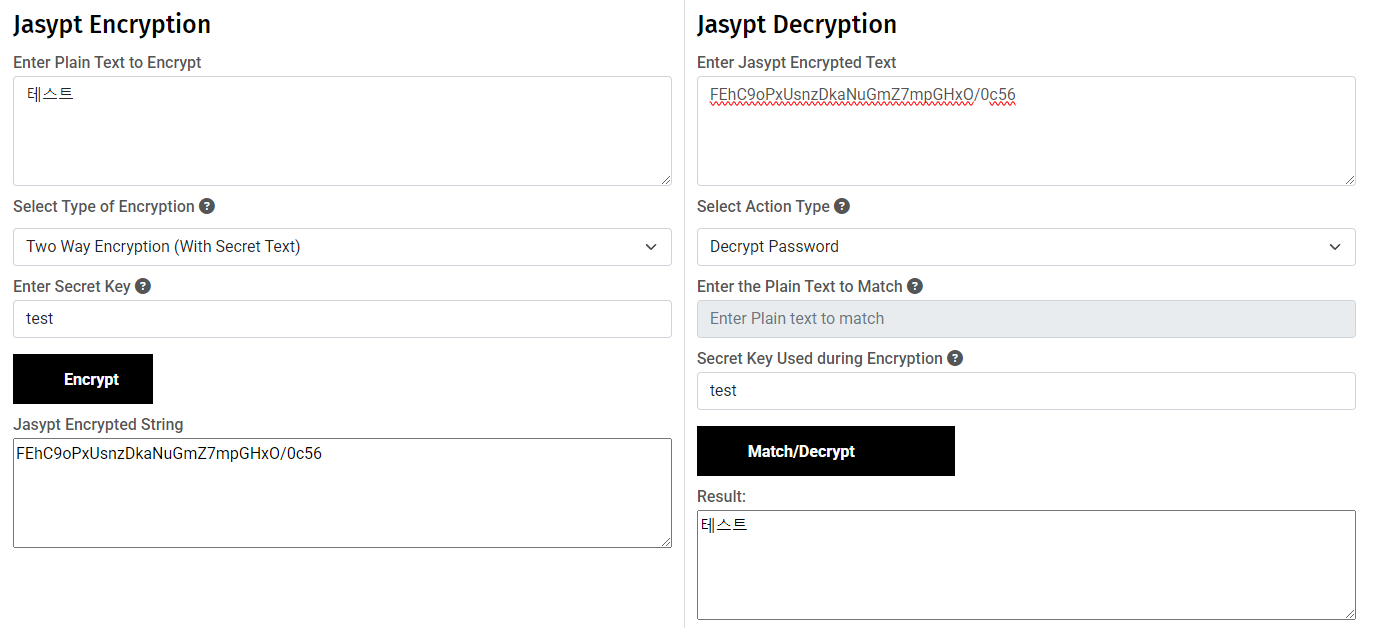
2. 사이트 활용하여 암호화 값 생성
https://www.devglan.com/online-tools/jasypt-online-encryption-decryption
Jasypt Encryption and Decryption Online
Jasypt online free tool for encryption and decryption.This tool supports one way and two way password encryptor using Jasypt as well as matching encrypted password using Jasypt.
www.devglan.com
application.properties 파일 설정
spring.datasource.url=ENC(your-encrypted-url)
spring.datasource.username=ENC(your-encrypted-username)
spring.datasource.password=ENC(your-encrypted-password)
환경 변수 설정
암호화 키는 환경 변수 또는 시스템 속성으로 전달한다.
1. 톰캣 배포시 (Windows/Linux 등 OS 환경에서 설정)
1.1 Windows에서 환경 변수 설정
고급 시스템 설정에서 설정하거나 cmd 창에서 아래 명령어 사용
set JASYPT_ENCRYPTOR_PASSWORD=your-secret-key
1.2 Linux에서 환경 변수 설정
Bash Profile 설정(예: /etc/profile, ~/.bashrc)
export JASYPT_ENCRYPTOR_PASSWORD=your-secret-key
2. VSCode에서 Spring Boot 실행시
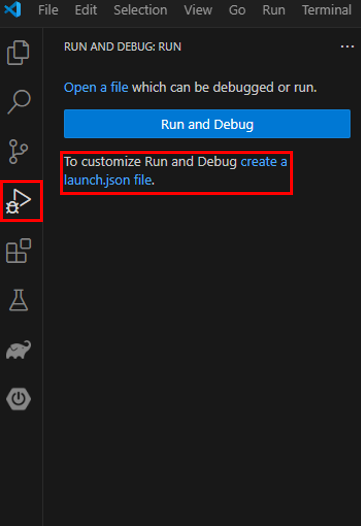
VSCode에서 환경 변수를 설정하려면 launch.json 파일에 추가하거나 터미널에서 직접 설정한다.
2.1 launch.json 파일에 설정
Run and Debug 탭에서 create a launch.json file 클릭
launch.json
{
  "version": "0.2.0",
  "configurations": [
    {
      "type": "java",
      "name": "Spring Boot",
      "request": "launch",
      "mainClass": "com.example.Application",
      "env": {
        "JASYPT_ENCRYPTOR_PASSWORD": "your-secret-key"
      }
    }
  ]
}
3. Spring Boot Suite, eclipse 에서 실행시
실행 설정에서 환경 변수를 추가
3.1 Run Configurations 설정
1. Run → Run Configurations 이동
2. Environment 탭 클릭
3. 새 환경 변수 추가
실행 및 테스트
로그 확인
INFO [main] Jasypt StringEncryptor가 성공적으로 설정되었습니다.
'Back-end > JAVA & Spring' 카테고리의 다른 글
| [ Spring Security ] 동적 URL 접근 권한 제어 구현 (1) | 2025.04.04 |
|---|---|
| [ Spring Boot ] Jasypt: Spring Boot에서 간단하고 안전한 암호화 (4) | 2025.01.16 |
| [ Spring Boot ] Banner 변경 (1) | 2024.12.24 |
| [ Spring ] application.properties 개발자 정의 경고 해결 (1) | 2024.11.25 |
| [ Spring ] batch 스케줄링 기간 설정 (3) | 2024.10.08 |


