
😺 GitHub 프로필 README 꾸미기
GitHub 프로필 README는 GitHub 프로필 상단에 표시되는 자기소개 페이지이다.
README.md 파일을 프로필 저장소에 추가하면 자동으로 표시된다.
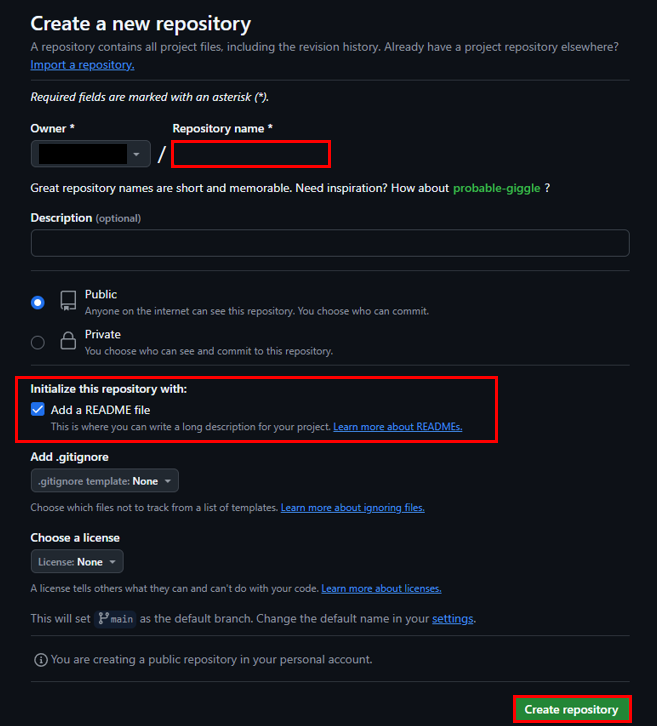
저장소 이름: 프로필 README는 반드시 [GitHub 사용자명]/[GitHub 사용자명] 형식의 저장소에 작성해야 한다
README 파일: 저장소에 README.md 파일을 추가하면 GitHub가 이를 자동으로 프로필 페이지에 렌더링 한다
Repositories > NEW 버튼 클릭

Owner(사용자명)과 동일하게 작성 후 Add a README file 체크
Create repository 버튼 클릭
생성 완료 후 프로필 페이지로 접근하면 샘플로 작성된 README 파일을 확인할 수 있다
수정버튼(연필)을 눌러 README.md 파일을 원하는 대로 수정 진행하면 된다
초기 README.md 파일
## Hi there 👋

<!--
**username/username** is a ✨ _special_ ✨ repository because its `README.md` (this file) appears on your GitHub profile.

Here are some ideas to get you started:

- 🔭 I’m currently working on ...
- 🌱 I’m currently learning ...
- 👯 I’m looking to collaborate on ...
- 🤔 I’m looking for help with ...
- 💬 Ask me about ...
- 📫 How to reach me: ...
- 😄 Pronouns: ...
- ⚡ Fun fact: ...
-->
작성 예시
<h1 align="center">👋 Hi there! I'm [Your Name]</h1>
<p align="center">
    🌱 Passionate about coding, learning, and sharing knowledge!<br>
    🔭 Currently working on [Project Name]!
</p>

<h2 align="center">🛠️ Tech Stack</h2>
<p align="center">
    <img src="https://img.shields.io/badge/Spring_Boot-6DB33F?style=flat&logo=spring-boot&logoColor=white"/>
    <img src="https://img.shields.io/badge/Java-007396?style=flat&logo=java&logoColor=white"/>
    <img src="https://img.shields.io/badge/MySQL-4479A1?style=flat&logo=mysql&logoColor=white"/>
</p>

<h2 align="center">🚀 Featured Projects</h2>
<ul>
    <li><a href="https://github.com/yourname/project1">Project 1</a>: A simple web application for managing tasks.</li>
    <li><a href="https://github.com/yourname/project2">Project 2</a>: A CLI tool for data analysis.</li>
</ul>

<h2 align="center">📬 Let's Connect</h2>
<p align="center">
    <a href="https://yourblog.com"><img src="https://img.shields.io/badge/Blog-FF5722?style=flat&logo=blogger&logoColor=white"/></a>
    <a href="mailto:youremail@example.com"><img src="https://img.shields.io/badge/Email-EA4335?style=flat&logo=gmail&logoColor=white"/></a>
</p>
본인 같은 경우에는 친구들 프로필 염탐 후 괜찮아 보이는 것들 조합하여 작성을 진행했다
README.md 파일에서 바로 작성 하기보다는 쉽게 작성할 수 있는 사이트가 있으니 해당 사이트에서 작업 후 붙여넣기 하는 것을 추천
[ ETC ] README란?, README 작성 툴 추천
📝 README소프트웨어 프로젝트를 개발하거나 관리하면서 작성해야 하는 파일 중 하나가 README이다README 파일은 프로젝트에 대한 전박전인 정보를 제공하는 문서로, 주로 프로젝트의 목적, 사용 방
euntry.tistory.com
😺 프로필 README 작업시 활용하기 좋은 도구
Capsule-render
헤더측에 많이 사용하는 이미지 생성 도구
아래 사이트에서 커스텀 후 생성된 url을 img 태그에 그대로 복사하면 된다
<img src="https://capsule-render.vercel.app/api?type=waving&height=300&color=gradient&text=Input%20text" />
https://capsule-render.vercel.app/
Capsule-Render
capsule-render.vercel.app
https://github.com/kyechan99/capsule-render
GitHub - kyechan99/capsule-render: 🌈 Dynamic Coloful Image Render
🌈 Dynamic Coloful Image Render. Contribute to kyechan99/capsule-render development by creating an account on GitHub.
github.com
Awesome Badges
자신이 할 수 있는 기술, SNS 등을 공유할 때 많이 사용하는 뱃지
아래 github README에서 원하는 뱃지를 찾아 img 태그에 복사하여 사용하면 된다

<img src="https://img.shields.io/badge/Java-ED8B00?style=for-the-badge&logo=openjdk&logoColor=white" />
https://github.com/Envoy-VC/awesome-badges?tab=readme-ov-file#-group
GitHub - Envoy-VC/awesome-badges: 😎 A curated list of GitHub badges for your next project
😎 A curated list of GitHub badges for your next project - Envoy-VC/awesome-badges
github.com
Github Readme Stats
Github의 스탯과 가장 많이 사용한 언어를 그래프와 수치로 알려준다


<a href="https://github.com/anuraghazra/github-readme-stats">
  <img height=200 align="center" src="https://github-readme-stats.vercel.app/api?username={username}" />
</a>
<a href="https://github.com/anuraghazra/convoychat">
  <img height=200 align="center" src="https://github-readme-stats.vercel.app/api/top-langs?username={username}&layout=compact&langs_count=8&card_width=320" />
</a>
https://github.com/anuraghazra/github-readme-stats
GitHub - anuraghazra/github-readme-stats: :zap: Dynamically generated stats for your github readmes
:zap: Dynamically generated stats for your github readmes - anuraghazra/github-readme-stats
github.com
Git Animals
깃허브 활동으로 펫을 획득하고 성장 시킬 수 있다

<a href="https://github.com/devxb/gitanimals">
  <img src="https://render.gitanimals.org/lines/{username}?pet-id={petid}" width="1000" height="120"/>
</a>
https://github.com/git-goods/gitanimals
GitHub - git-goods/gitanimals: 🦆 깃허브 활동으로 펫을 키우세요 / Have pet in your github
🦆 깃허브 활동으로 펫을 키우세요 / Have pet in your github. Contribute to git-goods/gitanimals development by creating an account on GitHub.
github.com
다른 사람의 프로필 README Code를 확인하고 싶다면
프로필의 사용자명 클릭
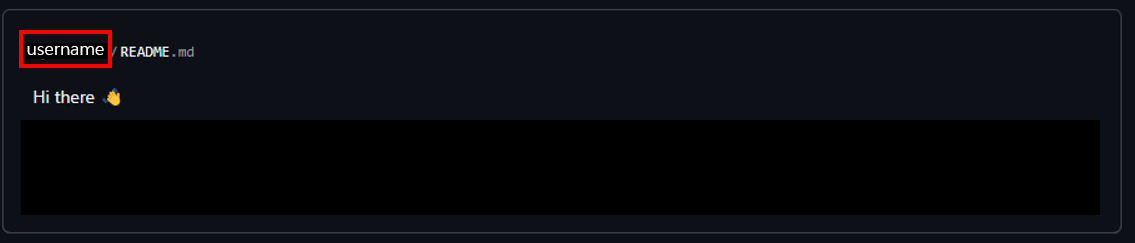
repository로 이동 후 README.md 파일 클릭

좌측 상단의 Code 버튼 클릭

'Back-end > 형상관리' 카테고리의 다른 글
| [ GitHub ] github stats box 설정 (1) | 2024.12.23 |
|---|---|
| [ GitHub ] Token 발급 (1) | 2024.12.23 |
| [ Git ] Git 이관 중 read-tree -m -u -v HEAD HEAD: command returned error: 128 에러 발생 (1) | 2024.09.10 |
| [ Git ] SVN에서 Git 이관 (2) | 2024.09.10 |
| [ Git ] Git 이관 (원격 저장소 URL 변경) (2) | 2024.09.09 |


